
Tutorial 1: Choosing a Content Management System (CMS)
Lots of platforms that use the concept of CMS or content management system where users can create content in the form of text, images and videos. In the case of blogging, like WordPress, Blogspot and Tumblr. Each platform has its own advantages.
Blogspot . One platform that has been well-known and popular is still many users. To use Blospot you are free of charge or free. Because this service is a Google product, of course, it is more value to appear on Google search pages.
Tumblr . Ever triumphant in its time, the famous tumblr with a type of lightweight content is even more suitable to be called social media like Facebook or Twitter. Most tumblr users contain nerd and geek . One disadvantage of this platform is that it is not familiar with SEO.
WordPress . As a newcomer this platform has advantages compared to other types. Can use your own domain even provide hosting services. Easy use and SEO friendly . Many other platform users decided to migrate to WordPress even the big media set up their site through this CMS.
Tutorial 2: Determine Themes

[Source: techstack.in]
Blogs must have certain themes, not that you make content that is specific but the theme helps you to find the identity of the blog later. Some bloggers who are well-known in the niche just call Raditya Dika (Male Goat) who discusses about his personal funny experiences. Or Rangga Aditia (raditheraphy) who reviewed the latest film.
Don't choose a difficult theme because you want to look cool. Find something close to you so it's easy to create content. The quality of writing can be accounted for later.
Tutorial 3: Choosing a Domain Name
This domain name is very important for you to think far away because if you want to change the name of the site, the visitor traffic will start from zero again. Because of that, prepare a name that is cool and easy to remember. There are also many bloggers who choose to use their names as sites.
Why is that? First, it is seen from the side of branding that they have more value. Second, it feels personal and close to both the blog owner and the reader. Third, it is not difficult to memorize and the possibility of wanting to change names will be small. Maybe you can consider this.
Also Read: How to Easily Download Torrents
Tutorial on Creating Blogspot

After implementing tutorials 1 to 3, then go to the practice stage, which is creating a blogspot. Here's how you can follow:
Open the blogger.com site page then click 'Create Your Blog'.
Enter the Gmail address.
Enter the password then click 'Next'.
Then you are taken to a page that asks to use your Google+ profile or create a new profile. We recommend that you connect Google+ to Blogspot.
When using Google+, the form will be filled automatically with existing data. Click 'Create your Profile'.
Enter the profile photo you want and save it by clicking 'Save'.
Then you will be taken to the Google+ profile page then click 'Continue to Blogger'. And select 'Create a New Blog'.
Please fill in the form provided, for example, the name of the blog, the name of the site, and the desired theme of the display.
Finally, click 'Create Blog'. Then your blog is ready to use!
Tutorial on Making Tumblr
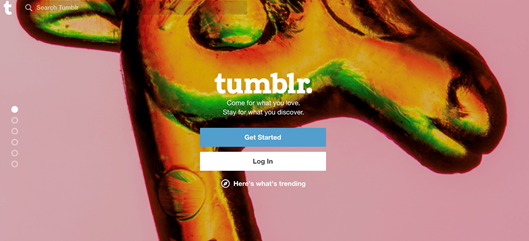
If you prefer to use tumblr instead of blogspot don't worry! You can follow the steps below.
Go to the tumblr.com page and click 'Get Started'.
Enter your username , email address and password. Then click 'Sign Up'.
Then you will be asked to enter an age to adjust the rules and policies of tumblr.
Then enter the security code to verify you are not a robot and click 'Almost Done'.
Next you are asked to follow some tumblr blogs. Choose at least three as a requirement.
In the next step you are asked to enter a photo profile, the name of the blog is a brief description.
Finally, verify your tumblr account in the email then the blog is ready for you to use!
After finishing creating a blog account, you are very obliged to update the latest posts at least one post per week. Why? This is done to attract many readers especially if you discuss the latest issues which certainly make people more happy to read your blog. Here are the writing tips that we recommend:
Make a title that is interesting and inviting curiosity
Give a brief description in the first paragraph
Make writing with a minimum of 300 words, keep it short!
Learn to use SEO, find the latest keywords that you can use
Use clear meta tags to easily enter the search page
Include good images that are relevant to the content
Don't choose a difficult theme because you want to look cool. Find something close to you so it's easy to create content. The quality of writing can be accounted for later.
Tutorial 3: Choosing a Domain Name
This domain name is very important for you to think far away because if you want to change the name of the site, the visitor traffic will start from zero again. Because of that, prepare a name that is cool and easy to remember. There are also many bloggers who choose to use their names as sites.
Why is that? First, it is seen from the side of branding that they have more value. Second, it feels personal and close to both the blog owner and the reader. Third, it is not difficult to memorize and the possibility of wanting to change names will be small. Maybe you can consider this.
Also Read: How to Easily Download Torrents
Tutorial on Creating Blogspot
After implementing tutorials 1 to 3, then go to the practice stage, which is creating a blogspot. Here's how you can follow:
Open the blogger.com site page then click 'Create Your Blog'.
Enter the Gmail address.
Enter the password then click 'Next'.
Then you are taken to a page that asks to use your Google+ profile or create a new profile. We recommend that you connect Google+ to Blogspot.
When using Google+, the form will be filled automatically with existing data. Click 'Create your Profile'.
Enter the profile photo you want and save it by clicking 'Save'.
Then you will be taken to the Google+ profile page then click 'Continue to Blogger'. And select 'Create a New Blog'.
Please fill in the form provided, for example, the name of the blog, the name of the site, and the desired theme of the display.
Finally, click 'Create Blog'. Then your blog is ready to use!
Tutorial on Making Tumblr
If you prefer to use tumblr instead of blogspot don't worry! You can follow the steps below.
Go to the tumblr.com page and click 'Get Started'.
Enter your username , email address and password. Then click 'Sign Up'.
Then you will be asked to enter an age to adjust the rules and policies of tumblr.
Then enter the security code to verify you are not a robot and click 'Almost Done'.
Next you are asked to follow some tumblr blogs. Choose at least three as a requirement.
In the next step you are asked to enter a photo profile, the name of the blog is a brief description.
Finally, verify your tumblr account in the email then the blog is ready for you to use!
After finishing creating a blog account, you are very obliged to update the latest posts at least one post per week. Why? This is done to attract many readers especially if you discuss the latest issues which certainly make people more happy to read your blog. Here are the writing tips that we recommend:
Make a title that is interesting and inviting curiosity
Give a brief description in the first paragraph
Make writing with a minimum of 300 words, keep it short!
Learn to use SEO, find the latest keywords that you can use
Use clear meta tags to easily enter the search page
Include good images that are relevant to the content


